How Much Does Microsoft Fabric Cost? Pricing, Reservations and Licensing (Part 3)
Microsoft Fabric pricing explained: pay-as-you-go vs reservation, the 60% rule, how to cost an operation in CUs and the F64 threshold for licenses.

Founder · MCT · Editor of the official DP-600 book
En resumen
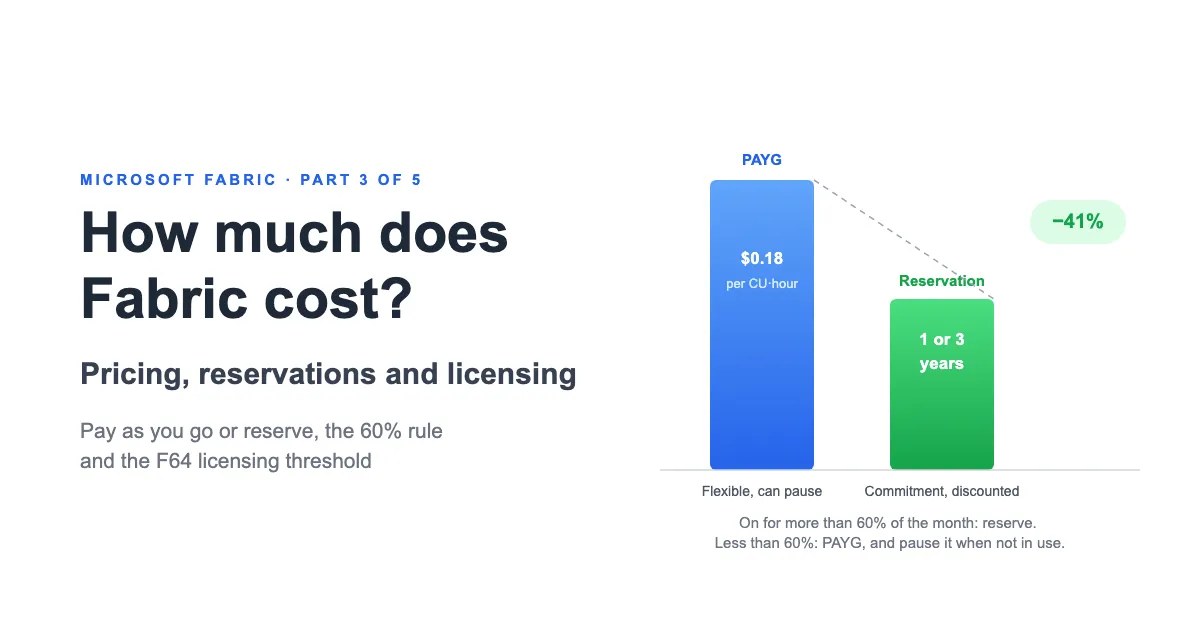
Today an F capacity can be paid for in two ways: pay-as-you-go (flexible, billed per second, can be paused) or a 1- or 3-year reservation at about 41% off. On 28 September Microsoft announced a third option, the F0 capacity with on-demand billing, still without a published price. The rule of thumb: if the capacity will be on for more than 60% of the month, a reservation is usually cheaper. But the SKU is only half the bill: per-user licenses, storage and separate meters make up the total cost, and from F64 upward Power BI consumers no longer need their own license.
- PAYG: about $0.18 per CU per hour, the same across all SKUs; billed per second and can be paused.
- Reservation: a 1- or 3-year commitment at about 41% off; bought in CUs, not whole SKUs.
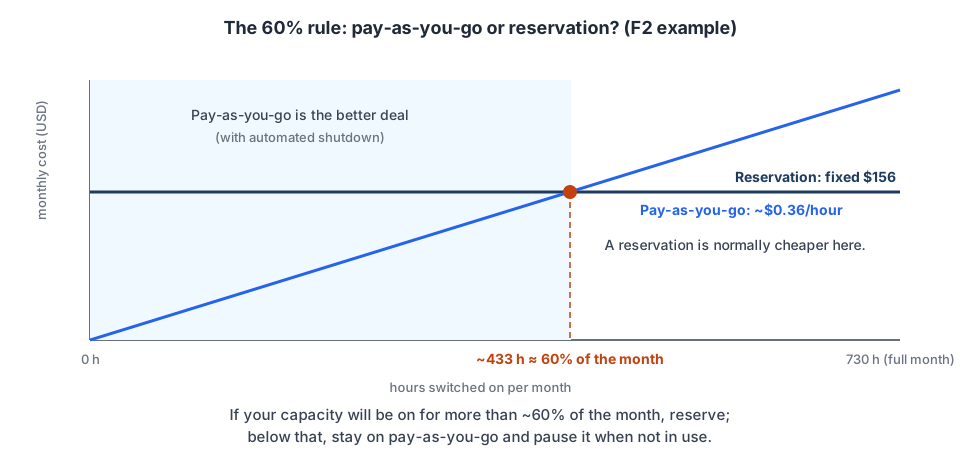
- The 60% rule: on for more than about 433 hours a month → reserve; fewer → PAYG with pauses.
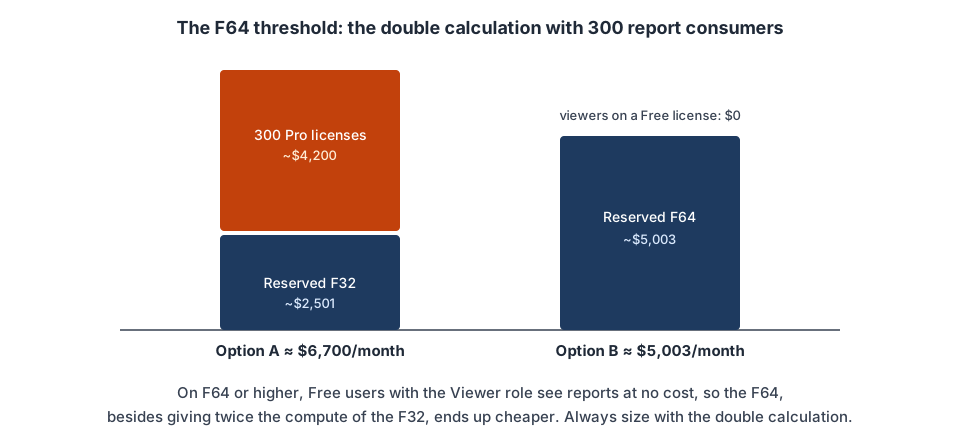
- The F64 threshold: from F64 upward, consumers view Power BI with a Free license; below it, every viewer needs Pro or PPU.
In Part 1 and Part 2 (in Spanish) we covered how the model works. This part covers how a capacity is billed, when it makes sense to pay as you go or buy a reservation, and what adds to the total besides the SKU: user licenses, storage and a few other charges.
How do you pay for a Fabric capacity?
Microsoft Fabric F capacities are purchased in Azure. On top of that base capacity there are two main ways to pay:
- Pay-as-you-go.
- A capacity reservation for one or three years.
The technical capacity is the same in both cases; only the billing changes.
How does pay-as-you-go (PAYG) work?
With the PAYG model you are charged for your capacity for as long as it is active, whether you are using it or not. The main advantage of this model is flexibility:
- It requires no long-term commitment.
- You can change the SKU.
- You can pause and resume the capacity, and you don’t pay for compute while it is paused.
Azure F capacities are billed per second, with a one-minute minimum. So if you keep a capacity active for fifteen minutes, you pay for roughly those fifteen minutes, not a full hour.
What happens when you pause a capacity
F capacities can be paused and resumed from Azure, through automation such as Azure Automation runbooks, or with the Azure Resource Manager APIs, the Fabric REST APIs or a Logic App.
While the capacity is paused:
- PAYG compute for the base capacity is not billed.
- Items assigned to the capacity become unavailable.
- New operations are rejected.
- OneLake storage continues to be billed.
- The capacity must be resumed before those items can be used again.
When you pause a capacity, however, Microsoft adds up the pending smoothed consumption and accumulated overages and charges them immediately to your Azure bill.
That makes pausing right after a heavy load the least convenient moment, because it concentrates at once consumption that, with the capacity active, could have been spread out and gradually reduced during quieter hours through burndown. For that to happen, however, the capacity has to stay on, and those hours also cost money.
So in that scenario the decision has to be made in economic terms, comparing the charge from settling the pending consumption immediately against the cost of keeping the capacity active for the hours needed to complete the burndown.
What is a capacity reservation and how much does it save?
A reservation is a commitment to capacity usage for one or three years. It can be paid up front or monthly. In exchange, Microsoft applies a discount of about 41% on the corresponding PAYG rate.
When you create an F64 capacity in Azure, it is initially a PAYG resource. The reservation is then bought from Azure Reservations and works as a billing benefit: when Azure detects capacity usage that matches the reservation’s region, scope and attributes, it applies the discount automatically.
Terms, flexibility and limits of a reserved capacity
Before buying a reservation, check what you can change during its term, what happens when it ends and which costs fall outside the discount.
Cancellation, exchange and renewal
- Cancellation. A reservation can be canceled. The refund is prorated over the remaining term, based on the current price of the reservation, and is applied as a credit to your Azure account. There is a limit: the total of canceled commitments within the same billing scope can’t exceed USD 50,000 in a rolling 12-month window.
- Exchange. A reservation can also be exchanged. This includes a direct path to swap Azure Synapse Analytics Dedicated SQL pool reservations for Fabric reservations. The process runs as two separate transactions: returning the existing reservation and buying a new one. The new reservation’s total commitment must be equal to or greater than the remaining commitment of the returned one.
- Renewal. A reservation doesn’t renew automatically by default. When it expires the capacity keeps running, but its usage moves to pay-as-you-go billing. You can turn on automatic renewal to avoid this.
Reservations are bought in CUs
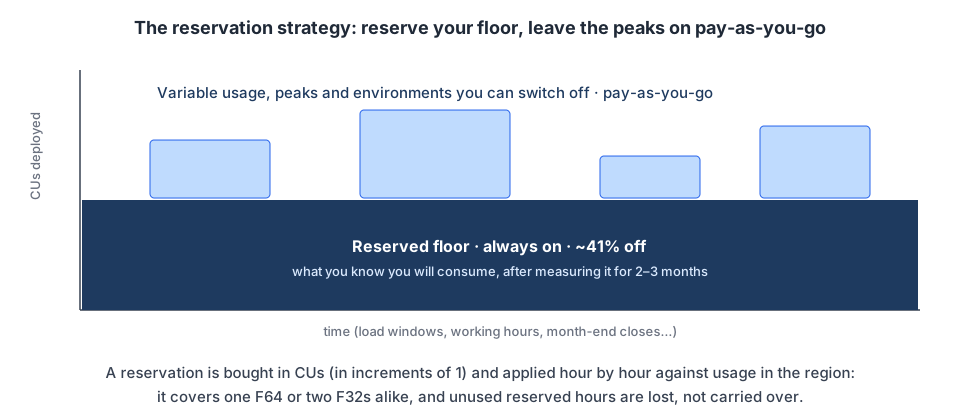
Reservations are bought as a quantity of Capacity Units, in increments of one CU. You don’t have to reserve a whole SKU as an indivisible unit.
This allows several scenarios, as long as the capacities match the reservation’s scope and region:
- You reserve 64 CUs and use one F64: all 64 CUs are covered.
- You reserve 64 CUs and use two F32 capacities: both can be covered.
- You reserve 64 CUs and use one F128: 64 CUs are covered and the rest is billed at PAYG.
- You reserve 64 CUs and use only one F32: the 32 reserved CUs not used during that hour are lost.
Unused reserved CUs don’t carry over to the next hour.
What is covered, and operational limits
- A reservation only covers compute. Storage, data transfer and other networking services are billed separately.
- You can pause a reserved capacity, but it saves nothing, because the commitment stays in force for the whole reservation term.
When should you choose PAYG or a reservation?
The choice between pay-as-you-go (PAYG) and a reservation depends mainly on how many hours the capacity will stay on and how stable that usage is. Before deciding, it helps to understand how the prices behave.
Reference prices
The following table uses reference prices for a US region. In this example the PAYG price is about $0.18 per CU per hour, and it stays the same across all SKUs.
| SKU | CU | PAYG per hour | PAYG per month | Reservation per month | CU-seconds per hour |
|---|---|---|---|---|---|
| F2 | 2 | $0.36 | $262.80 | $156.33 | 7,200 |
| F4 | 4 | $0.72 | $525.60 | $312.67 | 14,400 |
| F8 | 8 | $1.44 | $1,051.20 | $625.33 | 28,800 |
| F16 | 16 | $2.88 | $2,102.40 | $1,250.67 | 57,600 |
| F32 | 32 | $5.76 | $4,204.80 | $2,501.33 | 115,200 |
| F64 | 64 | $11.52 | $8,409.60 | $5,002.67 | 230,400 |
| F128 | 128 | $23.04 | $16,819.20 | $10,005.33 | 460,800 |
| F256 | 256 | $46.08 | $33,638.40 | $20,010.67 | 921,600 |
| F512 | 512 | $92.16 | $67,276.80 | $40,021.33 | 1,843,200 |
| F1024 | 1,024 | $184.32 | $134,553.60 | $80,042.67 | 3,686,400 |
| F2048 | 2,048 | $368.64 | $269,107.20 | $160,085.33 | 7,372,800 |
| F4096 | 4,096 | $737.28 | $538,214.40 | $320,170.67 | 14,745,600 |
| F8192 | 8,192 | $1,474.56 | $1,076,428.80 | $640,341.33 | 29,491,200 |
So moving up a SKU gives you more processing capacity, but the cost rises in the same proportion. There is no extra volume discount between SKUs.
Prices can vary by region, currency and your organization’s commercial terms: as of this writing, a CU-hour costs $0.22 in West Europe and $0.28 in Brazil South. Always check the official Microsoft Fabric pricing page before making a final estimate.
The break-even point between PAYG and a reservation
With an F2 capacity:
- The reservation costs about $156 a month.
- The PAYG price is about $0.36 per hour.
The break-even point is the monthly cost of the reservation divided by the PAYG hourly price:
$156 ÷ $0.36/hour ≈ 433 hours a month ≈ 60% of the month switched onThat is about 60% of the hours in a month.
Based on this, the recommendations are:
- Start on PAYG (or with the 60-day trial), measure your real usage for 2-3 months with the Capacity Metrics App, and only move to a reservation once you know your consumption pattern.
- If the capacity will be on for more than 60% of the month, a reservation will normally be cheaper.
- If you expect it to be on for less than 60% of the month, it will normally be cheaper to stay on PAYG and pause it when not in use.
Can you combine a reservation and PAYG?
A recommended strategy is to reserve the most stable and predictable part of your usage and keep the variable part, the peaks and any capacities that can be paused on PAYG.
For example, if an organization permanently keeps a baseline equivalent to 32 CUs but at certain times scales up to 64 CUs, it could reserve 32 CUs and pay for the other 32 CUs at the PAYG rate during the periods when they are needed.
This strategy reduces two risks:
- Buying reserved CUs that you then don’t use.
- Buying a reservation based on an exceptional peak that doesn’t represent your usual consumption.
Smoothing spreads the consumption of certain operations over time. So when sizing, look at the smoothed consumption pattern, the sustained load, concurrency and the level of capacity that has to stay provisioned on a stable basis, as well as an operation’s instantaneous peak.
However, if the peaks come mainly from interactive operations, keep in mind that these are smoothed over much shorter periods than background operations. If that demand recurs and the capacity needs extra headroom to avoid delays or throttling, that headroom is part of your stable need and should be counted when deciding how much to reserve.
What changes with the F0 capacity and on-demand billing?
On 28 September, at FabCon Europe in Barcelona, Microsoft announced the F0 capacity: a capacity with no compute contracted up front, where you pay only for the processing you use in the supported categories and, separately, for storage. It also announced that on-demand billing, which today exists only for Spark, will extend to other categories on F2 or larger capacities.
As of this writing, I can’t find a dedicated F0 page on Microsoft Learn or a published price: Learn only mentions it in passing, in the billing notes for planning in Fabric. Until there is a price, don’t budget with it: the numbers in this article are still the pay-as-you-go and reservation ones.
What is documented is capacity overage: when usage exceeds the capacity and would otherwise be throttled, Fabric pays off the excess and charges it at 3 times the pay-as-you-go rate, only for the CU-hours beyond your SKU. It is enabled by default when you create a capacity and is controlled with a rolling 24-hour threshold, which the charge can exceed. Details are in the Microsoft documentation on capacity overage.
Does the price change by Azure region?
A Fabric capacity is created in a specific Azure region, and its price can vary by region. The general recommendation is to place it in your tenant’s home region. Choosing another region means using Multi-Geo, which can introduce some limitations.
This decision deserves care, because once the capacity’s region is chosen it can’t be changed. The only option would be to create a new capacity and migrate or redeploy the compatible content.
How much does a specific operation cost inside Fabric?
A capacity’s monthly price doesn’t tell you what a specific operation costs: a refresh, a query, a pipeline run.
The Fabric Capacity Metrics App expresses each operation’s accumulated consumption in CU-seconds, shown as CU(s). This unit can feel abstract, though: if I tell you a pipeline consumed 288,000 CU(s), it’s hard to know right away whether that is a lot or a little. To make comparison easier, the recommendation is to convert CU-seconds into CU-hours and multiply them by the price of one CU per hour.
The conversion comes down to these calculations:
Price per CU-hour = SKU hourly price ÷ SKU CUs
CU-hours consumed = Operation consumption in CU(s) ÷ 3,600
Estimated cost    = CU-hours consumed × Price per CU-hour
Suppose we have an F2 at $262.80 a month and an operation of 100,000 CU(s). From the price table we take the F2’s figure directly, $0.36 per hour, and divide it by its 2 CUs to get the price per CU-hour ($0.18). With that price we can cost the operation:
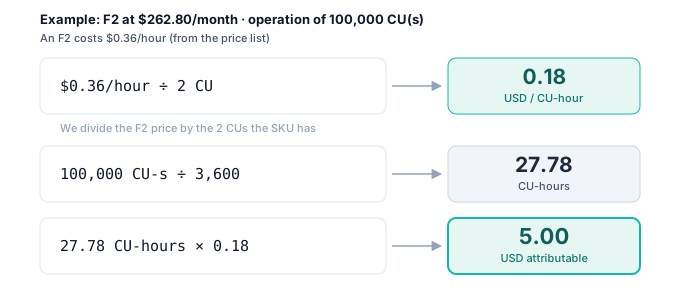
So that operation is equivalent to 27.78 CU-hours and represents about $5.00 of attributable consumption.
This calculation is useful for cost analysis and chargeback: it lets you compare operations, identify expensive processes and make optimization decisions (should I refactor this pipeline? should I move it to a notebook?). However, it doesn’t necessarily mean the operation adds exactly $5.00 to your Azure bill.
On PAYG, billing depends mainly on how long the capacity stays active. With a reservation, you pay for the commitment even if part of the capacity goes unused. So the result should be read as an estimate of the capacity cost consumed or attributable, not always as a real incremental cost.
Which user licenses do you need on top of the capacity?
Fabric is paid for on two axes: the capacity on one side and per-user licenses on the other.
The three per-user licenses:
- Free. Assigned automatically the first time you sign in to the Fabric portal, if the tenant has it enabled. It lets you create and share non-Power BI Fabric items (lakehouses, notebooks, warehouses, pipelines) when the workspace runs on an F or trial capacity. However, it doesn’t let you create Power BI content in shared workspaces, or view it when it is hosted on a capacity below F64.
- Pro. The Power BI collaboration license: it lets you create, publish and share reports and semantic models. Authors need Pro or PPU regardless of the capacity size. On capacities below F64, consumers also need Pro or PPU.
- PPU (Premium Per User). It includes all Pro features and adds Power BI Premium features per user, such as up to 48 scheduled refreshes a day, XMLA access and semantic models of up to 100 GB.
The F64 threshold
If you use Power BI, licensing changes at F64:
- On a SKU below F64, every user who wants to view Power BI content needs their own Pro or PPU license.
- On F64 or higher, consumers with a Free license can view reports as long as they have the Viewer role or access them through a Power BI app.
- On every SKU, users who create, publish or modify Power BI content still need Pro or PPU.
Imagine 300 report consumers:
- Option A: reserved F32 (
$2,501) + 300 Pro licenses ($4,200) ≈ $6,700/month - Option B: reserved F64 (~$5,003) + 0 licenses for viewers ≈ $5,003/month
Which costs fall outside the capacity price?
While the capacity is active, the operations you run consume the CUs available within the SKU you bought. Even so, the capacity price doesn’t necessarily include every cost of the solution. Separate charges can appear for:
- OneLake storage: billed separately, although storage in Fabric is relatively cheap, at around $23 to $26 per TB per month in US regions (hot tier).
- Pro or PPU licenses.
- If you enable business continuity and disaster recovery (BCDR), data is geo-replicated, storage costs about 1.8 times as much per GB ($0.0414 against $0.023 in East US 2) and write operations consume more CUs.
- Cache for certain Real-Time Intelligence items. Check it separately on the Fabric pricing page.
- Networking or data egress.
- Capacity overage: an optional feature that automatically pays for usage beyond the capacity before Fabric applies throttling.
- On-demand billing for Spark (Autoscale Billing on the pricing page), a separate PAYG model for certain Apache Spark workloads.
- Other external services used by the solution.
Monitoring has a cost too: Workspace Monitoring runs on an eventhouse in your workspace, so it consumes capacity, and Azure Log Analytics is a separate Azure service with its own pay-as-you-go bill.
Is a smaller SKU just slower, or does it also have fewer features?
The SKU size can also affect limits such as:
- Maximum semantic model memory.
- Concurrency.
- Spark limits.
- Parallelism.
- Certain operational limits.
- Ability to recover from peaks.
- Amount of included mirroring storage.
So choosing a SKU based only on average CUs can lead to mistakes. You should check the specific technical limits of each workload.
In conclusion
The cost of Microsoft Fabric depends on the SKU, the payment model, Power BI licenses, storage and a few other charges.
The most efficient strategy is usually:
- Start on PAYG and measure real usage for at least 2-3 months.
- Reserve only the stable, predictable capacity.
- Keep peaks and temporary environments on PAYG.
- Evaluate capacity and licenses together, especially around the F64 threshold.
- Check the SKU’s technical limits as well as its number of CUs.
Understanding these components lets you choose a capacity that covers demand without paying for resources you don’t use. If your company wants to diagnose costs, audit existing models or migrate licenses without overspending, take a look at our Power BI consulting and Fabric implementation services. Buying correctly is only part of the savings; the rest comes from reducing the CUs your operations consume.
In Part 4 of this series (in Spanish) we cover optimization and monitoring: how to make your capacity do more and cost less, how to identify the operations that consume the most CUs, how to read the Capacity Metrics App and how to decide which processes to optimize first.
Published by