Capacity, SKU and CU: Understanding the Microsoft Fabric Capacity Model (Part 1)
What a capacity is in Microsoft Fabric, what the SKU means and how CUs are consumed: the basis for sizing well and saving thousands of dollars a month.

Founder · MCT · Editor of the official DP-600 book
En resumen
Microsoft Fabric is billed by capacity, not by operation: you buy a SKU measured in CUs per second, and every workload draws from that same capacity for as long as it stays active.
- The SKU sets the CUs available per second and the price.
- Consumption depends on the operation’s rate and its duration.
- Optimizing means reducing execution time and choosing the right engine.
- The ETL tool is also a cost decision: a non-CI/CD Dataflow Gen2 consumes 16 CU/s while a Spark notebook consumes 0.5 CU/s per vCore.
- The free trial lets you measure real workloads before buying a capacity.
As a data engineer, you need a good understanding of the impact of the decisions you make and what you build on your data platform, and how that relates to cost.
So the first step is to understand how Fabric’s billing model works, along with the good practices to apply when designing your solutions, because this can translate into a difference of thousands of dollars for your company.
This billing model is quite different from what you may be used to on other platforms such as Synapse or Databricks, where you pay for what each job or cluster consumes. In Fabric you buy a single “pool” of compute up front, and all the engines draw from that same pool for as long as it’s switched on, whether you use it a lot or a little.
That’s why, instead of asking “how much did this job cost me?”, you start asking “does everything I run fit inside the capacity I paid for?”. Almost everything in this series comes from that question: what a capacity and a SKU are and how they relate, how Microsoft calculates what your operations consume, the types of operations (background and interactive), the concepts of bursting, smoothing and throttling, and how to keep your solution optimized so it’s as cost-effective as possible.
What billing models does Microsoft Fabric have?
Fabric has these billing models:
- The capacity model: this is the default model and the one this series focuses on: you buy a fixed amount of compute and all your workloads share that budget.
- On-demand billing for Spark (announced at FabCon 2025 as Autoscale Billing for Spark): a pay-as-you-go model for Spark workloads only, where jobs run on dedicated serverless resources and are billed separately, much like Databricks or Synapse.
- F0 capacity with on-demand billing (announced on 28 September 2026 at FabCon Europe): a capacity with no compute contracted up front, where you pay only for the processing you use in the supported categories. As of this writing it has no published price; what is known so far is in Part 3.
What is a capacity, and how does it relate to the SKU and CUs?
A capacity in Fabric is an amount of compute resources that Microsoft gives you to do things in Fabric: transform data, load data, interact with a Power BI report. All of these actions consume this capacity, and that consumption is measured in “capacity units” (CUs). I should warn you that the capacity model can feel a little abstract, because a CU isn’t a machine or a processor as such, but a unit of measure that represents the compute you are using.
Before moving on, it helps to understand how Microsoft Fabric is organized, because nearly all the cost optimization strategies we’ll see later rest on this structure:
- Your organization has a Microsoft Entra ID tenant (usually just one).
- Within that tenant you can create as many capacities as you need. Each one is a dedicated compute resource that isn’t shared with other customers.
- Each workspace is assigned to a capacity. Several workspaces can share the same capacity, but a workspace can only be associated with one capacity at a time.
- From that moment on, all the workloads that run in that workspace (refreshes, notebooks, pipelines, queries and so on) consume Capacity Units (CUs) from the assigned capacity.
The root level: your organization in Fabric. There is usually just one.
The compute you buy, measured in CUs (F2 = 2, F4 = 4…). Dedicated, not shared with anyone.
Where your items live. It is assigned to a capacity, and everything it runs consumes that capacity's CUs.
That last point makes the workspace the basic unit for allocating and analyzing costs. Later on, when we talk about separating workloads, isolating environments or splitting costs between teams, all those decisions start from this same rule.
What does F2 or F64 mean in the SKU name?
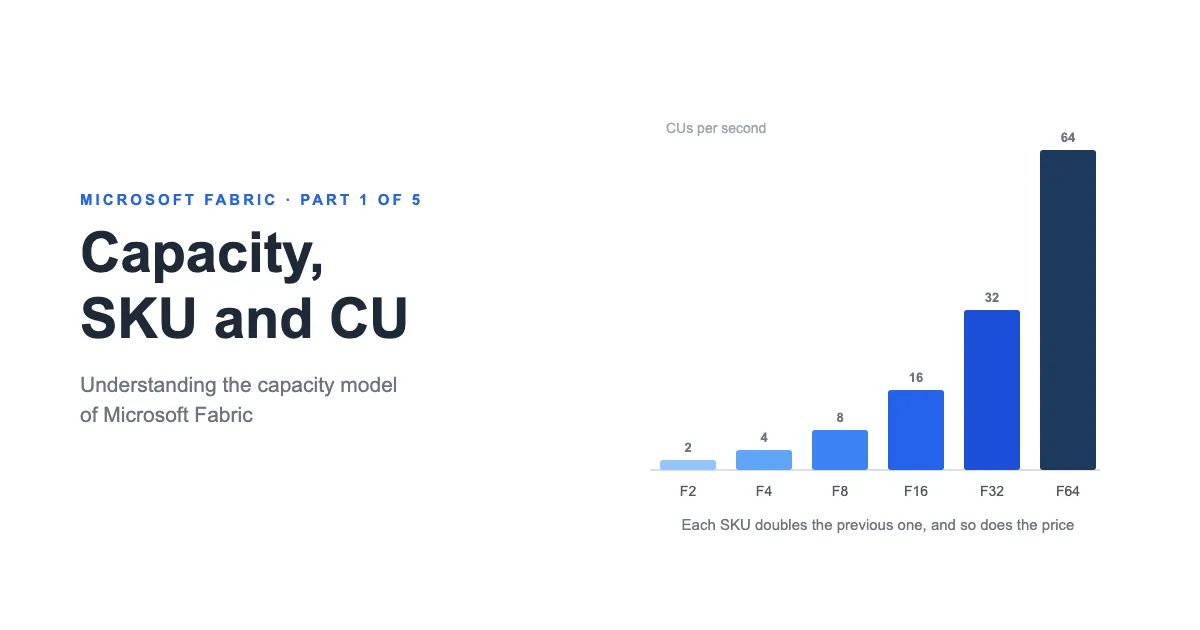
The SKU name tells you how much capacity you are buying. The letter F identifies Microsoft Fabric capacities, and the number represents the Capacity Units available per second (CU/s). For example, an F2 offers 2 CU/s and an F64, 64 CU/s.
Each level doubles the CUs of the previous one and, because pricing scales linearly, also roughly doubles its cost.
| SKU | CU/s | Pay-as-you-go (month) | Reserved (month, ~41% off) |
|---|---|---|---|
| F2 | 2 | $262.80 | $156.33 |
| F4 | 4 | $525.60 | $312.67 |
| F8 | 8 | $1,051.20 | $625.33 |
| F16 | 16 | $2,102.40 | $1,250.67 |
| F32 | 32 | $4,204.80 | $2,501.33 |
| F64 | 64 | $8,409.60 | $5,002.67 |
| F128 | 128 | $16,819.20 | $10,005.33 |
| F256 | 256 | $33,638.40 | $20,010.67 |
| F512 | 512 | $67,276.80 | $40,021.33 |
| F1024 | 1,024 | $134,553.60 | $80,042.67 |
| F2048 | 2,048 | $269,107.20 | $160,085.33 |
| F4096 | 4,096 | $538,214.40 | $320,170.67 |
| F8192 | 8,192 | $1,076,428.80 | $640,341.33 |
| Trial | 4 or 64 | Free for 60 days | — |
Doubling the CUs doesn’t necessarily mean each operation will run twice as fast, though. An F8, for example, won’t run your notebook four times faster than an F2. The effect depends on the engine, the type of workload and whether that operation can make use of additional resources.
A larger capacity mainly gives you more resources to run simultaneous operations, absorb peaks and sustain a higher load before reaching the capacity’s limits. Think of it like an internet connection: buying more bandwidth doesn’t guarantee that a single page loads proportionally faster, but it does let more people browse at the same time without the service degrading.
What is a CU and how is it consumed?
A CU is the unit Microsoft Fabric uses to measure compute capacity. Each SKU provides a certain number of CUs per second: an F2 offers 2 CU/s, an F4 offers 4 CU/s, and so on.
To analyze capacity usage, Fabric divides time into 30-second intervals called timepoints. So:
- One minute contains 2 timepoints.
- One hour contains 120 timepoints.
- One day contains 2,880 timepoints.
For every SKU:
| SKU | CU/s | CU-seconds per timepoint (× 30 s) | CU-seconds per hour (× 120 tp) | CU-seconds per day (× 2,880 tp) |
|---|---|---|---|---|
| F2 | 2 | 60 | 7,200 | 172,800 |
| F4 | 4 | 120 | 14,400 | 345,600 |
| F8 | 8 | 240 | 28,800 | 691,200 |
| F16 | 16 | 480 | 57,600 | 1,382,400 |
| F32 | 32 | 960 | 115,200 | 2,764,800 |
| F64 | 64 | 1,920 | 230,400 | 5,529,600 |
| F128 | 128 | 3,840 | 460,800 | 11,059,200 |
| F256 | 256 | 7,680 | 921,600 | 22,118,400 |
| F512 | 512 | 15,360 | 1,843,200 | 44,236,800 |
| F1024 | 1,024 | 30,720 | 3,686,400 | 88,473,600 |
| F2048 | 2,048 | 61,440 | 7,372,800 | 176,947,200 |
| F4096 | 4,096 | 122,880 | 14,745,600 | 353,894,400 |
| F8192 | 8,192 | 245,760 | 29,491,200 | 707,788,800 |
For example, an F2 capacity provides:
- 2 CUs per second.
- 60 CU-seconds during a 30-second timepoint.
- 7,200 CU-seconds during an hour.
- 172,800 CU-seconds during a full day.
These values represent the compute available in each period, not an amount you have to consume. If an operation uses fewer resources, the remaining capacity stays available for other operations or to absorb smoothed consumption.
How is a job’s CU consumption calculated?
When you run a notebook or start a pipeline, Microsoft works out its consumption from two variables:
- The consumption rate of the operation
- The processing time
The consumption rate
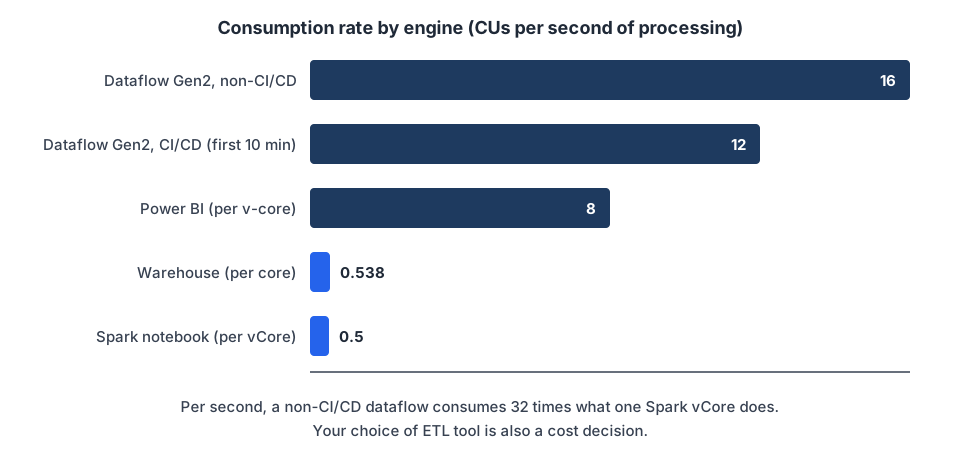
Each type of operation in Fabric has a relatively fixed consumption rate, measured in CUs per second of processing. Here are the links where you can see the details of those rates:
| Workload | CUs per second of processing | Source |
|---|---|---|
| Dataflows Gen2, standard compute | 16 (non-CI/CD); 12 for the first 10 minutes of a query, then 1.5 (CI/CD) | Dataflow Gen2 pricing |
| Power BI | 8 (per v-core) | Fabric operations |
| Data Warehouse | 0.538 (per warehouse core) | Fabric operations |
| Spark notebooks | 0.5 (per vCore) | Spark compute |
Per second, a non-CI/CD Dataflow Gen2 consumes 32 times what one Spark vCore does. On a CI/CD dataflow the gap is 24 times during a query’s first 10 minutes and 3 times after that. Staging and fast copy have their own rates (6 and 1.5 CU/s). That doesn’t mean a dataflow will always cost you 32 times more than a notebook, because a notebook uses several vCores and run times differ, but it does mean that your choice of ETL tool is also a cost decision.
Copilot consumes the same capacity
Copilot’s consumption is calculated differently from the rest, because it is measured in tokens, according to the Copilot consumption documentation:
- Inputs consume 100 CU-seconds per 1,000 input tokens (10 CU-seconds when the input is cached).
- Outputs consume 400 CU-seconds per 1,000 output tokens.
There is no separate bill for each use of Copilot: its consumption is charged to the Fabric capacity you already have.
The processing time
The second variable is the processing time, or how long the operation takes to finish.
Unlike the consumption rate, duration can vary considerably. In a Python notebook, for example, it depends on the data volume, the complexity of the transformations, the available parallelism, the Spark configuration and the efficiency of the code.
Total consumption comes from combining both variables:
Consumption in CU(s) = consumption rate × processing timeThat’s why an operation with a low consumption rate can end up consuming more CUs than one with a high rate if it takes much longer to finish. Shorter run times improve performance and directly reduce capacity consumption.
Conclusions
The first practical conclusion of this series: to optimize Microsoft Fabric, reduce processing time and choose the right artifact or engine for each workload, besides running fewer operations.
Each type of operation has a set consumption rate, but its final impact on the capacity depends on how long it runs, the resources it uses and the characteristics of the engine. That’s why two alternatives that meet the same need, such as a Dataflow Gen2 and a notebook, or an Import model and a Direct Lake one, can consume very different amounts.
Also, an operation’s visible duration doesn’t always tell you by itself how many CUs it consumed. Some workloads can use bursting to temporarily access more resources than the SKU provides as a baseline, so a short query may have consumed more CUs per second than its duration suggests. We look at this behavior in more detail in Part 2 (in Spanish).
My recommendation
Use the formulas and consumption rates to get a first estimate, but don’t make architecture decisions based only on theoretical calculations.
When you need to compare two alternatives, run them under equivalent conditions and check their real consumption in the Microsoft Fabric Capacity Metrics App. Compare the CU-seconds consumed, the run time, the performance you get and the effect on the rest of the capacity, and then make your decisions based on that.
And if those numbers don’t add up when you look at them, or you aren’t sure where to start optimizing, that’s exactly the job of the Fabric Clarity Check: measuring your capacity’s real consumption and sorting out which artifacts to tackle first.
Continue the series
- Part 2: Bursting, smoothing and throttling (in Spanish): how your capacity lends you compute, charges it back in installments and slows you down in stages when you go over.
- Part 3: How much does Microsoft Fabric cost?: pricing, pay-as-you-go vs reservation, the 60% rule and the F64 threshold that defines licensing.
Published by