End of Power BI Premium: Time to Move to Fabric
Power BI Premium P SKUs can't be bought or renewed: each ends with your agreement. P1 maps to F64—licensing and a safe migration path.

Founder · MCT · Editor of the official DP-600 book
En resumen
Power BI Premium per-capacity SKUs (P SKUs) are retired: they can no longer be bought or renewed, and each subscription ends when its current agreement ends. Nothing converts on its own: you buy a Fabric capacity (F SKU) and reassign your workspaces to it. A P1 maps to an F64, the size from which viewers can use a free license.
- There is no single cutoff date: each P SKU ends with its agreement. After that comes a 30-day grace period, throttled access from day 31 to day 90, and from day 91 every operation is rejected. Data is kept but can’t be reached.
- F64 is the licensing threshold: on an F64 or higher SKU, content can be viewed with a free licence. Below F64, every viewer needs Pro or Premium Per User.
- Pay-as-you-go changes the economics: Fabric capacity can be scaled up, scaled down and paused, which Premium could not do.
- Migration is workspace by workspace: reassign each workspace to the new capacity, from the portal or the API.
- Power BI Embedded and per-user licensing are affected too — check both before you move.
Power BI Premium per-capacity SKUs have been retired: they can no longer be bought or renewed, because the service is now part of Microsoft Fabric. There is no single cutoff date: each subscription ends when its current agreement ends. From that day you get a 30-day grace period, throttled access from day 31 to day 90, and from day 91 every operation is rejected. A Fabric capacity includes Power BI with all Premium functionality and adds the rest of the services, such as Data Factory, Synapse Real-Time Analytics, and OneLake.
Due to this change, existing Power BI Premium per capacity customers should transition to a suitable Microsoft Fabric capacity and pricing plan at the time of their next renewal. Fabric capacities offer multiple additional benefits, including:
✅ Pay-as-you-go billing options: These allow for dynamic scaling of capacity, increasing or decreasing as needed, with the possibility of pausing to optimize costs.
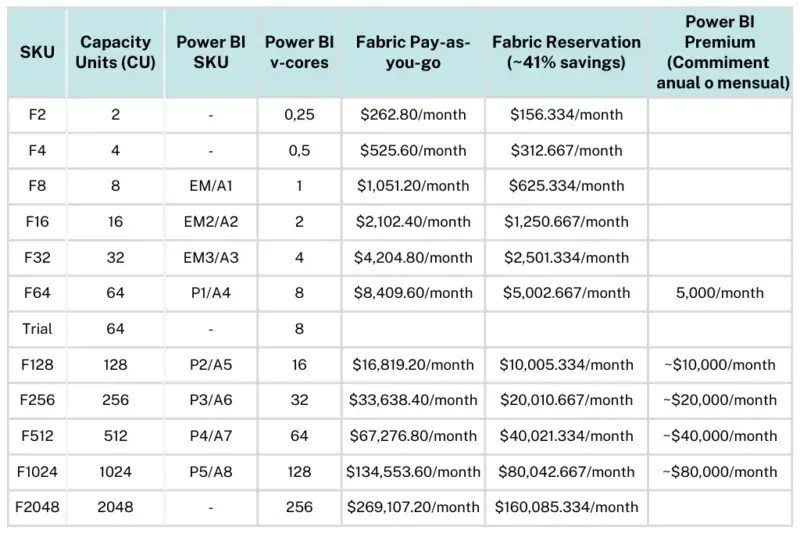
✅ Save costs with Microsoft Fabric Capacity Reservation: Reservation pricing for Fabric allows organizations to pre-commit Fabric Capacity Units (CU) in one-year increments, helping them save up to 40.5% over the Fabric pay-as-you-go prices. This reservation also allows for more flexibility in SKU size, allowing the reservation discount to apply to other capacities within the same scope.
✅ Access to exclusive Azure features: Such as trusted workspace access for OneLake shortcuts and Managed Private Endpoints for Spark. These functions are native to Azure and not available to Power BI Premium capacity customers.
✅ Eligibility for the Microsoft Azure Consumption Commitment (MACC): Which allows customers to benefit from Azure consumption programs, maximizing their cloud investment.
⚠️ Important: Power BI Premium capacities will not automatically convert to Microsoft Fabric capacities. It will be necessary to acquire a Fabric capacity at the time of your next renewal. Once acquired, you should reassign your workspaces to the new Fabric capacity to ensure continuity of your operations and take advantage of the unified platform’s benefits.
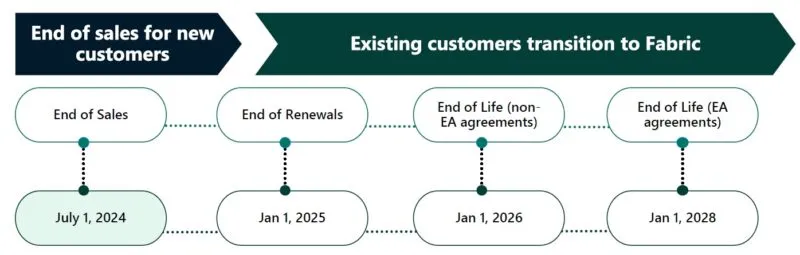
The original announcement timeline (2024):
| Milestone | Date |
|---|---|
| End of sales for new customers | July 1, 2024 |
| End of renewals | January 1, 2025 |
| End of life — non-EA agreements | January 1, 2026 |
| End of life — Enterprise Agreement (EA) customers | January 1, 2028 |
Update (July 2026): the official documentation no longer works with fixed end-of-life dates: each Premium subscription now ends when the customer’s current agreement term expires, with no new purchases or renewals (the exception is customers with an active Enterprise Agreement, who can keep renewing annually until their EA term ends). Once the subscription ends there is a 30-day grace period with the capacity running, from day 31 to 90 access is throttled (interactive operations are delayed), and from day 91 onward all operations are rejected: your data is retained but inaccessible until you reassign the workspaces to a Fabric capacity.
With the transition from Power BI Premium to Microsoft Fabric, it’s essential to carefully plan the migration of your workspaces and artifacts to ensure a smooth transition. Below is a structured process and key considerations for performing this migration.
Migrating Workspaces from Power BI Premium to Fabric Capacity
Pre-Migration Considerations
-
Extended Access to Data: After pausing Power BI Premium capacities, you’ll have 90 days to access the data hosted in these capacities. This allows for migration without the need to pay simultaneously for P (Premium) and F (Fabric) SKUs.
-
Temporarily Disable Fabric Features: If your environment has few or no Fabric artifacts, consider disabling Fabric features to simplify and accelerate the migration process.
Step-by-Step Migration
Manual Migration
-
Navigate to Capacity settings in the Admin portal.
-
Select the Fabric capacity.
-
In the “Workspaces assigned to this capacity” section, click on Assign Workspaces.
Workspaces can be assigned to a Fabric capacity in the following ways:
-
By users: All workspaces managed by those users, including their “My Workspaces,” are assigned to the Premium capacity. This includes reassigning workspaces already assigned to another Premium capacity. Additionally, users also receive workspace assignment permissions.
-
Specific workspaces: Select individual workspaces to assign to the Fabric capacity.
-
The entire organization’s workspaces: All workspaces, including “My Workspaces,” are assigned to the Premium capacity. All current and future users receive workspace assignment permissions. This option is not recommended; a more specific approach is preferable.
-
Choose one of the mentioned methods to assign the workspaces to the Fabric capacity and click Apply.
-
Refresh the page and validate that the migrated workspaces appear in the “Workspaces assigned to this capacity” section within the Fabric capacity.
Automated Migration
For organizations with hundreds or thousands of workspaces, using the “Assign to Capacity”API REST is the best option. This tool allows for automated migrations by programmatically creating pay-as-you-go F-SKUs for each selected capacity (reserved F-SKUs will be automatically created soon) and ensures that the F-SKU is in the same region, has equivalent capacity, includes the same administrators, migrates all workspaces, and transfers all capacity settings.
This tool can handle the following scenarios:
-
Creation of F-SKU: If your F-SKU hasn’t been created yet, it will first be created, and then the rest of the process will be completed. If you already have an F-SKU, creation will be skipped, and the rest of the process will be completed.
-
Migration of multiple capacities: It’s possible to migrate a single capacity, a list of capacities, or all capacities.
-
Migration of trial capacities: This tool also allows migrating Fabric trial capacities to paid Fabric capacities.
Recommendations for an Effective Migration
-
Plan downtime during the workspace migration process when nothing is running, or migrate workspaces at different times as they become inactive.
-
Migrate non-business-critical workspaces first and validate before migrating production workspaces.
Frequently Asked Questions
What do CU and SKU mean in Fabric?
-
Capacity: A capacity is a group of resources assigned in Microsoft Fabric that reside in a tenant. The size of the capacity determines the amount of compute power available.
-
SKU: Capacities are divided into Stock Keeping Units (SKUs), which provide a set of Fabric resources for the organization measured in Capacity Units (CU) that represent the processing power available for each SKU.
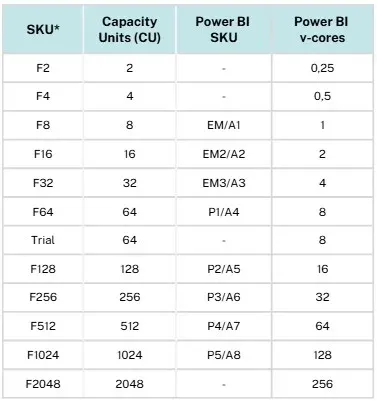
SKUs smaller than F64 require a Pro or Premium per user (PPU) license to create Power BI reports and consume content. With an F64 or higher SKU, content can be viewed with a free Microsoft Fabric license if the content is in the capacity. Fabric items that are not Power BI items do not require a Pro license.
The type of SKU you need will depend on the type of solution you want to implement. To calculate the required capacity size you can start by using a Fabric trial to measure capacity consumption and then analyze the capacity consumption with the Microsoft Fabric capacity metrics app. Or consult with a Microsoft Fabric consultant to help you estimate the most appropriate capacity.
What happens to companies with a Premium license that are only interested in using Power BI?
Going forward, Microsoft Fabric is positioned as a superset of Power BI Premium, integrating all the capabilities of Power BI Premium along with additional services and tools available at no additional cost. Below is a table comparing the costs of Fabric and Power BI Premium capabilities:
This means that, in addition to Power BI, you will have access to:
-
Data Factory: Automation of ETL/ELT flows to integrate data.
-
Lakehouses and OneLake: Centralization of data in a unified lake.
-
Data Warehouse (DWH): Storage optimized for structured analysis.
-
Real-time Analytics: Processing of real-time data.
-
Data Science: Advanced capabilities for data science and notebooks.
Companies could be incurring additional costs by paying for separate tools for these functions, an expense that Microsoft Fabric eliminates by consolidating everything into a single platform. Additionally, licenses equivalent to Power BI Premium in Fabric include Copilot, an artificial intelligence tool that accelerates report development, data integration, and analysis, improving team productivity and efficiency.
What is the impact on Power BI Embedded and the rest of Power BI licensing?
With the retirement of Power BI Premium capacity, Microsoft Fabric is now positioned as the central solution for analytical capabilities. This transition brings the following implications:
-
Compatibility with Power BI Embedded: If you acquire a Microsoft Fabric SKU (F SKU), you can use it for all Power BI Embedded integrated activities. Fabric capacities are designed to replace the functionality of Power BI Premium SKUs, allowing you to maintain advanced integration and analysis.
-
Power BI Pro and Power BI Premium per user (PPU) are not impacted by this retirement.
-
Power BI Pro or Premium Per User (PPU) licenses are required to publish Power BI content.
-
F64 or higher SKUs allow free users to consume Power BI content and apps in the service. These capacities are aligned with the Microsoft Fabric model.
-
SKUs below F64 require users to have a Pro license to access content.
-
Power BI Report Server is now included with F64+ Reserved Instance purchases: You can get the PBIRS key in the “Fabric Capacity” tab under “Capacity Settings” in the admin portal. It’s also available with SQL Server Enterprise core licenses with software assurance.
Conclusion
The migration process to Microsoft Fabric is relatively straightforward but can be tedious and time-consuming. Clients need to acquire and configure new Fabric capacities, transfer their Power BI workspaces, and reconfigure scheduled jobs. Although the risk of data loss is low, the process requires testing and can distract teams from their regular tasks.
Ready for the change?
You don’t have to face the task of understanding Fabric licenses or migrating your Power BI workspaces alone. At NuData, we are your trusted partner, with highly trained experts and extensive experience in migrating Power BI workspaces. We facilitate a smooth and hassle-free transition, ensuring that your migration is quick, efficient, and in the best hands.
Keep in mind that planning and executing this migration well in advance of your premium license expiration date is essential to face this change smoothly, avoiding unexpected interruptions, and allowing your organization to start taking advantage of the enhanced capabilities that Microsoft Fabric brings.
Whether you need help planning your migration, training, or ongoing assistance, we have everything you need.
📆 Contact us today and let us accompany you in this important step towards Microsoft Fabric.
Published by